YTBE's SuiteWorld 2026 review: clear field descriptions, role-based testing and AI unit planning shape how useful NetSuite's AI is. Five steps to start now.
NetSuite users hoping to switch on the platform's AI features may find the technology is only as reliable as the data descriptions underneath it — a point YTBE, Inc. drove home in a review published after Oracle's SuiteWorld 2026 conference.
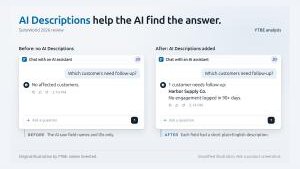
NetSuite's AI tools are only as good as the setup behind them. The companies that start that work now will be the ones getting real answers from their ERP next year.”— Jeffrey Hansbury, President and CEO, YTBE, Inc.NJ, UNITED STATES, November 2, 2026 /EINPresswire.com/ — During the conference, an Oracle presenter put a question to NetSuite's built-in assistant, Ask Oracle, asking which customers required follow-up based on data stored in a custom record type. The assistant returned no results. Once brief, plain-English descriptions were attached to the record type and its fields, the identical query surfaced the correct customer.
The NetSuite consultancy YTBE, Inc., which took in the sessions, has now released a review centered on that episode. Combining what it observed at SuiteWorld with lessons from its own client engagements, the firm argues that the value of NetSuite's AI hinges on how well a company documents its own data.
"Most NetSuite accounts have fields labeled wrong, no descriptions, cryptic IDs and three fields that mean the same thing," said Jeffrey Hansbury, President and CEO of YTBE. "The companies that start that work now will be the ones getting real answers from their ERP next year."
Those annotations in the demo rely on a NetSuite capability known as AI Descriptions, which administrators can attach to a record type or field, with a limit of 280 characters each. Producing them requires the people who understand what the data represents, plus an administrator or NetSuite partner to enter the text. Confirming that the descriptions actually work is a separate exercise: real questions must be tested under each role and the responses checked against the underlying data — an evaluation stage where YTBE says most teams need assistance.
Consumption is tracked in AI units. Every General Access user — NetSuite's standard full user license — contributes 1,000 units per month to a single pool shared across the account for the year, and any units left unused at year-end are forfeited. Additional units can be purchased in blocks through a NetSuite account representative. By way of illustration, a 20-user account would hold roughly 240,000 units annually. In one developer session, a single scheduled agent run consumed about 74 units, consistent with YTBE's own testing: analytics-related questions begin at around 30 units, while multi-step tasks consume more. An agent run on a daily basis would burn through about 27,000 units a year — approximately 11 percent of the pool — before any testing takes place. Assistants that connect via Oracle's AI Connector do not draw on NetSuite AI units, per Oracle's documentation and YTBE's experience.
Who is asking also shapes the answer. Each assistant operates within the user's role, meaning a sales rep and a controller can legitimately receive different responses to the same question, and a scheduled agent only sees what the role selected at setup permits. Transactions land as drafts for review, AI-populated fields carry a "Needs review" label, and agents remain inactive until an Administrator enables them.
YTBE's review further highlights a broader software-industry pattern: numerous new AI features route every request to a language model, including for the dashboards a business consults daily. In YTBE's assessment, much of that repetitive work is better handled by conventional reports and scripts. Many of the AI dashboard examples showcased at SuiteWorld — sales against plan or items approaching safety stock, for instance — can be delivered as standard NetSuite reports that produce the same result every time, can be verified line by line and consume no AI units. YTBE's recommended approach is to deploy AI to create those reports and scripts.
YTBE recommends five steps:
1) List the questions executives, finance and operations ask most.
2) Have an administrator or partner describe the fields those questions depend on, working with the people who use them.
3) Test each question under every role, check the answers against the data, and test again after any change.
4) Watch AI unit use from the start, decide who may turn on agents, and budget units for testing.
5) Use AI to build recurring reports, not to rerun them.
"Effective use of these tools requires more than a simple feature switch," Hansbury said. "Pick the questions the business reviews regularly, identify the records, fields and steps required to produce the response, test the answers under various roles, and plan your AI unit use carefully."
YTBE's AI readiness services cover writing AI Descriptions, building and running role-based tests, and setting agent and AI unit policies. The full review is available at https://ytbe.com/news/netsuite-ai-after-suiteworld-2026/.
NetSuite and Oracle are registered trademarks of Oracle and/or its affiliates. YTBE is not affiliated with or endorsed by Oracle.
Also worth a look: SyncSite sold at near asking price after 28 years, Website Closers brokers deal and Vadzo Imaging Validates 850nm and 940nm NIR on 20MP AR2020 GigE Wi-Fi Camera.
Jeffrey Hansbury
YTBE, Inc.
press@ytbe.com
Visit us on social media:
LinkedIn
Why it matters: The SuiteWorld demonstration shows that AI assistants in ERP systems can fail not because of the model but because of how a company labels its own records — a fix that costs effort rather than license fees. With AI units pooled annually and forfeited if unused, and answers varying by role, organizations that document fields and test queries now will stretch both their budgets and their trust in the results.