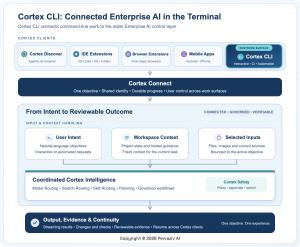
A fresh terminal-based interface integrates natural language engineering, project awareness, verification, and user oversight across macOS, Windows, and Linux.
The terminal is where code transforms from concept into a live system. Cortex CLI injects intelligence, project context, action, and validation there while ensuring developers stay in charge.”— Anoop Jaishankar
Pervaziv AI today unveiled Cortex CLI, a novel command-line experience that brings the Cortex Enterprise AI platform straight into the terminal—one of the most critical environments in contemporary software development.
Cortex CLI provides developers with a direct method for using Cortex from the command line. A user can articulate a goal in plain language, interact with Cortex in a conversational manner, examine suggested actions, and execute eligible work through investigation, implementation, testing, review, and validation—all without leaving the environment where the project already exists.
This release makes Cortex CLI the twelfth user-facing Cortex platform and product surface. Cortex now extends across five browser extensions, three IDEs, Android, iPhone, the dedicated Cortex Discover Agentic AI browser, and the new Cortex CLI.
## Where Software Work Becomes Real
—————————————————–
The terminal is where developers explore code repositories, run builds, troubleshoot failures, review changes, manage environments, automate delivery, and connect tools throughout the software lifecycle.
It is also an environment where conventional AI experiences can feel detached from the actual work.
A developer might pose a question in a separate assistant, paste the response into a shell, execute the suggested command, examine the output, and then need to explain the result. The user becomes the intermediary between the chat and the real project state.
Cortex CLI is built to reduce that gap.
Instead of treating the terminal as a destination for copied instructions, Cortex CLI makes it a first-class Cortex workspace. The conversation stays close to the repository, the tools, and the actions that ultimately determine whether an engineering goal is achieved.
“The terminal is where code transforms from concept into a live system,” said Anoop Jaishankar, Founder and CEO of Pervaziv AI. “Cortex CLI injects intelligence, project context, action, and validation into that environment while ensuring developers stay in charge of what happens next.”
The focus is not automation for its own sake. Rather, it is a more streamlined route from an engineering goal to work that can be inspected, tested, and reviewed.
## Natural Language Engineering in the Command Line
—————————————————————————
Cortex CLI lets developers interact with Cortex using the language of the objective instead of a menu of AI operations.
A developer can ask Cortex to comprehend an unfamiliar repository, diagnose a failing test, explain a configuration, craft a targeted code change, evaluate a patch, look up current documentation, or confirm whether completed work meets the original request.
The interaction can remain conversational when the task is open-ended. When the work becomes more structured, Cortex can help break the objective into steps while keeping key decisions visible.
This establishes a straightforward pattern. The developer describes the desired outcome. Cortex understands the available project context and helps organize the work. Proposed actions can be reviewed when they impact the project or environment. Progress remains visible as implementation and validation unfold. The developer can inspect the result and pick up from the same Cortex conversation.
The command line stays familiar. Cortex makes the AI experience a natural part of it.
## More Than a Terminal Chatbot
———————————————
Cortex CLI is not meant to be a standalone terminal assistant with its own identity, context, and operating model.
It is another interface for Cortex.
That distinction reflects the direction of the broader platform. Pervaziv AI has been expanding Cortex around a consistent idea: enterprise AI should meet users where work happens while preserving continuity, context, and control.
Cortex Connect introduced continuity across supported devices and work surfaces. Cortex Discover turned the browser into a dedicated agentic environment. Cortex Cloud added durable managed execution for eligible work. Recent Cortex releases also introduced Collections, Chat Forks, Governed Workflows, connected validation, runtime security, and a three-tier inference cache architecture designed to support faster and more reliable AI experiences.
Cortex CLI adds the command line to that larger platform story without requiring the terminal to become a separate AI product.
The result is a consistent Cortex identity across different environments, even though each environment contributes distinct capabilities.
## Coordinated Intelligence Behind One Request
——————————————————————
Terminal work can appear deceptively straightforward.
Two prompts may both ask Cortex to “check this project,” yet one may require code understanding, another may need up-to-date public information, another may demand security analysis, and another may call for testing or verification.
Cortex CLI participates in the broader Cortex AI Model Ensemble and the three Cortex Routers.
Model Routing helps connect a request with appropriate Cortex intelligence. Search Routing can bring current public information into the workflow when freshness is important. Skill Routing applies relevant engineering, testing, security, and verification practices.
The developer does not have to manually decide which underlying capability should handle every step.
Instead, the user states the objective, and Cortex can coordinate specialization behind the request.
This matters in the terminal because explaining a configuration file, investigating a new vulnerability, implementing a feature, reviewing a change, and validating a release are not the same task. Treating them as generic text generation can produce answers that sound helpful without being aligned to the work.
Cortex is designed to connect the request with the type of intelligence and practice the task actually requires.
## From Conversation to Engineering Workflow
—————————————————————
Useful engineering tasks rarely fit into a single prompt.
A framework upgrade may start with research, move into repository analysis, require implementation, uncover failing tests, and end with review. A defect may reveal another dependency. A developer may need to stop, return later, or continue the objective from another supported Cortex surface.
Cortex CLI is built to participate in that broader workflow model.
Recent Cortex capabilities introduced Chat Collections to organize related discussions, Chat Forks to explore another direction without losing the original conversation, and Governed Workflows to carry eligible objectives through investigation, implementation, testing, review, and verification.
The terminal provides a natural surface for those engineering tasks because it is already where many of the underlying tools are used.
A developer can continue an existing objective in Cortex CLI, inspect project evidence, review what remains to be done, and keep the conversation close to the affected code or environment.
The larger idea is continuity of work, not simply storage of chat history.
An AI system becomes more useful when the objective, progress, evidence, and important decisions can remain connected as the work evolves.
## Visible Action and User Control
———————————————-
Giving AI a meaningful role in the terminal also creates an important design requirement: action should not become invisible.
Reading project context is different from changing a file. Preparing a command is different from running it. Running a test is different from publishing software, changing infrastructure, or taking another consequential action.
Cortex CLI is designed to maintain those distinctions.
Developers can review proposed changes and command-line actions before they affect the workspace when approval is appropriate. Users can redirect the work, reject an action, or stop the task.
Organizational guidance and project context can inform the objective, but project content does not automatically grant itself authority to make consequential decisions.
This creates a practical division of responsibility. Cortex can understand the objective and prepare work. Cortex Safety and organizational policy can evaluate relevant boundaries. The CLI can present actions and outcomes where they occur. The user remains responsible for decisions that require human approval.
For Pervaziv AI, human control is not a feature added after agentic execution. It is part of the product model.
## Completion Should Be Grounded in Evidence
—————————————————————-
A confident AI response is not the same as a completed engineering task.
Code is not finished merely because it was generated. A defect is not resolved simply because a patch looks plausible. A review is not complete because an assistant produced a polished summary.
Cortex CLI keeps the requested outcome closer to the work used to establish it.
Tests, checks, diffs, project state, and workflow results can contribute to a reviewable conclusion. If validation fails, a command produces an unexpected result, or the environment changes, the experience can reflect that state rather than treating an earlier answer as final.
This aligns with the broader Cortex movement from conversation toward verified work.
The goal is not simply to generate more code from the terminal. It is to reduce the distance between what the user asked for, what Cortex did, and what the available evidence shows.
For developers, that can mean less time reconciling an assistant’s recommendation with the actual project. For engineering teams, it creates a clearer basis for review and repeatability.
Interactive Work and Automation
The command line is also more than an interactive prompt.
Engineering teams use terminals in remote development environments, containers, continuous integration systems, scheduled jobs, and internal automation.
Cortex CLI is designed for both interactive and automated use cases.
In an interactive session, a developer can collaborate with Cortex, inspect progress, provide direction, and review important actions. In automated environments, teams can request bounded work and receive stable, machine-readable results suitable for the surrounding workflow.
The approval boundary remains important. If a task reaches a decision that requires human authorization, automated operation should not quietly assume permission.
This gives organizations a more consistent product boundary across human-driven terminal work and engineering automation.
Instead of creating one assistant for a laptop, another integration for remote development, and a collection of unrelated scripts for automation, teams can work toward a common Cortex interaction model across those environments.
## Part of the Broader Cortex Platform
—————————————————–
Cortex CLI arrives as part of a wider Cortex platform spanning research, development, security, validation, browsers, mobile devices, and managed execution.
Cortex Connect is designed to preserve continuity across supported Cortex surfaces. Cortex Discover brings live browser context and agentic interaction into a purpose-built browser experience. Cortex Cloud provides durable managed execution for eligible work. Recent workflow capabilities help organize longer objectives and connect completion with validation and evidence.
Cortex CLI contributes something different: proximity to the command-line tools developers already trust.
The release does not depend on presenting every Cortex capability as a CLI capability. Instead, the command line becomes another important surface within the same platform vision.
A developer may research current documentation in Cortex Discover, continue engineering work in an IDE or Cortex CLI, check progress from another supported device, and use other Cortex capabilities where they fit the objective.
The interface changes with the work. The Cortex experience remains connected.
## A Connected Engineering Path
———————————————–
Cortex CLI becomes more valuable when an engineering objective moves across the places where developers already work.
Consider a framework upgrade. A developer may begin by reading current documentation in Cortex Discover or a supported browser. Search Routing can bring current public information into the investigation. The developer can then move closer to the project in an IDE or open Cortex CLI in the relevant repository to inspect dependencies, prepare changes, and run appropriate checks.
A production issue may follow another path. A team member may first encounter an alert in a browser, then continue the investigation in Cortex CLI on an approved environment, where the command line provides access to project tools, builds, tests, and evidence.
The point is not to make every Cortex surface identical. A browser is useful for current information. An IDE is close to source code. The terminal provides direct access to repositories and commands. Cortex Cloud provides a managed environment for eligible durable execution and validation.
Each surface contributes something different while the objective remains the organizing thread.
What Cortex CLI Changes for Engineering Teams
The immediate benefit is flow. Developers can reduce repeated movement between a separate AI chat and the shell where the work is actually happening.
The larger benefit is structural. Cortex CLI connects the command line to a Cortex platform already spanning browsers, IDEs, mobile devices, Cortex Discover, and Cortex Cloud.
That gives teams a consistent Cortex experience for coding, investigation, review, research, testing, and validation, with coordinated model, search, and skill routing and visible approval boundaries for consequential actions.
Speed without context can create rework. Action without control can create risk. Automation without evidence can make it difficult to know whether the task actually succeeded.
Cortex CLI brings the conversation closer to the tools and evidence that determine the result.
## Built for Real Engineering Environments
———————————————————
Enterprise development happens across different operating systems, network conditions, security policies, and deployment models.
Cortex CLI is available for macOS, Windows, and Linux. It is designed for ordinary interactive terminals, remote environments, and automated use cases.
That cross-platform availability matters because engineering teams rarely operate in one uniform environment. Developers may work on a Mac laptop, connect to a Linux system, build for multiple targets, or use Windows-based enterprise development environments.
A useful enterprise command-line experience needs to fit those workflows without forcing every developer to become an AI platform operator.
Cortex CLI is designed to feel native to the terminal while remaining part of the larger Cortex product.
## Twelve Surfaces, One Cortex Experience
———————————————————-
With Cortex CLI, Cortex now spans twelve user-facing platforms and product surfaces.
The five supported browser extensions are Google Chrome, Apple Safari, Microsoft Edge, Mozilla Firefox, and Brave. Cortex is also available across Microsoft Visual Studio Code, Microsoft Visual Studio, and JetBrains IntelliJ IDEA, as well as Android and iPhone.
Cortex Discover provides a purpose-built Agentic AI browser. Cortex CLI now brings the platform into the command line.
The number is a milestone, but it is not the main point.
The larger story is that enterprise AI does not need to live inside one chat window.
A question can begin on a phone. Research can continue in a browser. An engineering objective can move closer to the project in an IDE or the terminal. Longer work can remain organized through Cortex workflows. Different Cortex surfaces can contribute the context and capabilities that fit their role.
The user should not have to rebuild the objective simply because the interface changed.
That is the direction Pervaziv AI is pursuing with Cortex: one connected Enterprise AI platform that brings coordinated intelligence to the major surfaces where people research, build, review, and decide.
Cortex CLI brings that experience to the command line, where software work becomes concrete.
Twelve surfaces. One Cortex account. One connected experience. One path from intent to results teams can inspect.
## About Pervaziv AI
—————————-
Pervaziv AI develops Cortex, an Enterprise AI platform designed to connect intelligent assistance, software engineering, security, workflow continuity