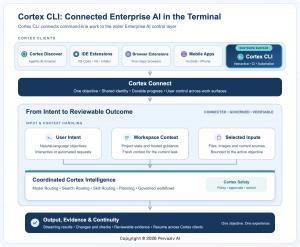
A fresh terminal-based tool merges natural language engineering, project awareness, verification, and user command across macOS, Windows, and Linux.
The terminal is the place where code transitions from concept to operational reality. Cortex CLI delivers reasoning, project awareness, execution, and verification to that space, all while ensuring developers remain in charge.”— Anoop Jaishankar
Pervaziv AI has introduced Cortex CLI, a novel command-line interface that integrates the Enterprise AI Cortex platform straight into the terminal, a critical workspace in contemporary software development.
Cortex CLI provides developers with a direct method for interacting with Cortex via the command line. A user can articulate a goal in natural language, engage with Cortex interactively, examine suggested actions, and execute appropriate work spanning investigation, implementation, testing, review, and validation without ever leaving the environment where the project resides.
This release marks Cortex CLI as the twelfth user-facing Cortex platform and product surface. Cortex now encompasses five browser extensions, three IDEs, Android, iPhone, the dedicated Cortex Discover Agentic AI browser, and the newly introduced Cortex CLI.
## Where Software Work Becomes Real
—————————————————–
The command line is where engineers explore codebases, execute builds, diagnose errors, review modifications, configure environments, automate deployments, and connect tools throughout the software lifecycle.
It is also a space where conventional AI experiences can feel detached from the actual work.
A developer might pose a question in a separate assistant, paste the reply into a shell, execute the suggested command, examine the output, and then return to explain the outcome. The user ends up acting as the intermediary between the dialogue and the real project state.
Cortex CLI aims to reduce that gap.
Instead of treating the terminal as a destination for copied instructions, Cortex CLI makes it a primary Cortex workspace. The interaction stays close to the repository, the tools, and the actions that ultimately decide whether an engineering goal succeeds.
“The command line is where software stops being an idea and becomes a running system,” said Anoop Jaishankar, Founder and CEO of Pervaziv AI. “Cortex CLI brings intelligence, project context, action and validation into that environment while keeping the developer in control of what happens next.”
The focus is not automation for its own sake. Rather, it is a more streamlined route from an engineering objective to work that can be inspected, tested, and reviewed.
## Natural Language Engineering in the Command Line
—————————————————————————
Cortex CLI enables developers to interact with Cortex using the language of the goal rather than a list of AI operations.
A developer can ask Cortex to comprehend an unfamiliar codebase, diagnose a failing test, clarify a configuration, draft a targeted code change, assess a patch, look up current documentation, or verify that completed work fulfills the original request.
The interaction can stay conversational when the task is open-ended. When the work becomes more structured, Cortex can help break the objective into steps while keeping key decisions visible.
This establishes a straightforward pattern. The developer describes the desired result. Cortex understands the available project context and assists in organizing the work. Suggested actions can be reviewed when they impact the project or environment. Progress stays visible as implementation and validation move forward. The developer can examine the outcome and pick up from the same Cortex conversation.
The command line remains familiar. Cortex makes the AI experience part of it.
## More Than a Terminal Chatbot
———————————————
Cortex CLI is not meant to be a standalone terminal assistant with its own separate identity, context, and operating model.
It is another surface for Cortex.
That distinction reflects the direction of the broader platform. Pervaziv AI has been expanding Cortex around a consistent idea: enterprise AI should meet users where work happens while preserving continuity, context, and control.
Cortex Connect introduced continuity across supported devices and work surfaces. Cortex Discover turned the browser into a dedicated agentic environment. Cortex Cloud added durable managed execution for eligible work. Recent Cortex releases also introduced Collections, Chat Forks, Governed Workflows, connected validation, runtime security, and a three-tier inference cache architecture designed to support faster and more dependable AI experiences.
Cortex CLI adds the command line to that larger platform story without requiring the terminal to become a separate AI product.
The result is a consistent Cortex identity across different environments, even though each environment contributes different capabilities.
## Coordinated Intelligence Behind One Request
——————————————————————
Terminal work can appear deceptively simple.
Two prompts may both ask Cortex to “check this project,” yet one may require code understanding, another may require current public information, another may require security analysis and another may require testing or verification.
Cortex CLI participates in the broader Cortex AI Model Ensemble and the three Cortex Routers.
Model Routing helps connect a request with appropriate Cortex intelligence. Search Routing can bring current public information into the workflow when freshness matters. Skill Routing applies relevant engineering, testing, security and verification practices.
The developer does not need to manually decide which underlying capability should own every step.
Instead, the user states the objective and Cortex can coordinate specialization behind the request.
This matters in the terminal because explaining a configuration file, investigating a new vulnerability, implementing a feature, reviewing a change and validating a release are not the same task. Treating them as generic text generation can produce answers that sound useful without being aligned to the work.
Cortex is designed to connect the request with the type of intelligence and practice the task actually needs.
## From Conversation to Engineering Workflow
—————————————————————
Useful engineering tasks rarely fit into one prompt.
A framework upgrade may begin with research, move into repository analysis, require implementation, uncover failing tests and end with review. A defect may expose another dependency. A developer may need to stop, return later or continue the objective from another supported Cortex surface.
Cortex CLI is designed to participate in that broader workflow model.
Recent Cortex capabilities introduced Chat Collections to organize related discussions, Chat Forks to explore another direction without losing the original conversation, and Governed Workflows to carry eligible objectives through investigation, implementation, testing, review and verification.
The terminal provides a natural surface for those engineering tasks because it is already where many of the underlying tools are used.
A developer can continue an existing objective in Cortex CLI, inspect project evidence, review what remains to be done and keep the conversation close to the affected code or environment.
The larger idea is continuity of work, not simply storage of chat history.
An AI system becomes more useful when the objective, progress, evidence and important decisions can remain connected as the work evolves.
## Visible Action and User Control
———————————————-
Giving AI a meaningful role in the terminal also creates an important design requirement: action should not become invisible.
Reading project context is different from changing a file. Preparing a command is different from running it. Running a test is different from publishing software, changing infrastructure or taking another consequential action.
Cortex CLI is designed to preserve those distinctions.
Developers can review proposed changes and command line actions before they affect the workspace when approval is appropriate. Users can redirect the work, reject an action or stop the task.
Organizational guidance and project context can inform the objective, but project content does not automatically grant itself authority to make consequential decisions.
This creates a practical division of responsibility. Cortex can understand the objective and prepare work. Cortex Safety and organizational policy can evaluate relevant boundaries. The CLI can present actions and outcomes where they occur. The user remains responsible for decisions that require human approval.
For Pervaziv AI, human control is not a feature added after agentic execution. It is part of the product model.
## Completion Should Be Grounded in Evidence
—————————————————————-
A confident AI response is not the same as a completed engineering task.
Code is not finished merely because it was generated. A defect is not resolved simply because a patch looks plausible. A review is not complete because an assistant produced a polished summary.
Cortex CLI keeps the requested outcome closer to the work used to establish it.
Tests, checks, diffs, project state and workflow results can contribute to a reviewable conclusion. If validation fails, a command produces an unexpected result or the environment changes, the experience can reflect that state rather than treating an earlier answer as final.
This aligns with the broader Cortex movement from conversation toward verified work.
The goal is not simply to generate more code from the terminal. It is to reduce the distance between what the user asked for, what Cortex did and what the available evidence shows.
For developers, that can mean less time reconciling an assistant’s recommendation with the actual project. For engineering teams, it creates a clearer basis for review