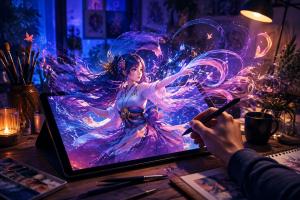
grok-imagine-character-animation-workflow
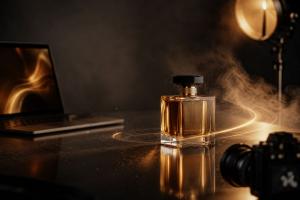
grok-imagine-spicy-experimental-visual
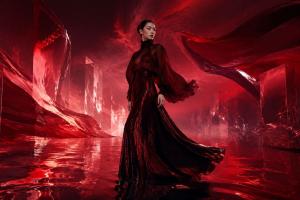
Discover how to leverage Grok Imagine on GoEnhance AI for converting photographs into brief video sequences through precise prompts, camera motion, artistic styles, and straightforward editing techniques.
SHERIDAN, WY, UNITED STATES, August 23, 2026 /EINPresswire.com/ — Producing a short video from a static photograph no longer demands a complete animation pipeline. With a suitable starting image, a well-defined prompt, and a clear concept of movement, creators can assemble product previews, character animations, promotional visuals, and social media content in just a handful of steps.
GoEnhance AI is an online suite of artificial intelligence tools designed for generating, editing, transforming, and enhancing both images and videos. Its browser-based applications cater to creators, marketers, designers, educators, agencies, and small production teams who wish to produce visual assets without managing a complex traditional workflow.
A specific image-to-video workflow on the platform grants users access to Grok Imagine. This model can take an existing picture as a visual foundation and introduce motion, camera direction, lighting shifts, atmosphere, and further scene elements. When a project demands a more daring, unconventional, or experimental visual approach, Grok Imagine Spicy is also available.
This tutorial outlines the process for achieving a stronger image-to-video outcome on GoEnhance AI, beginning with source image selection and ending with final clip review and editing.
1. Select a Sharp Reference Image
The quality of the source image significantly influences the resulting video. Start with a picture that features a single distinct subject, discernible lighting, and sufficient visible detail for the model to process.
Appropriate source images include:
– Product photography
– Character illustrations
– Fashion images
– Campaign posters
– Event graphics
– Food and beverage photos
– Lifestyle or landscape scenes
Steer clear of images where the main subject is obscured by objects, excessively cropped, or surrounded by heavy visual noise. A product must remain easily identifiable, and a character should present a readable face, posture, and silhouette.
If the image contains important text, consider adding that text after generation. Prices, dates, headlines, and calls to action are typically more manageable within a video editor than inside an AI-generated frame.
2. Determine the Video’s Core Message
Before drafting a prompt, clarify what the video needs to accomplish. A short clip might introduce a product, build anticipation for a launch, animate a poster, reveal a character, or offer a visual draft for a client.
The purpose shapes the motion. A product advertisement may call for a gradual camera zoom and controlled lighting. A social clip might benefit from a more rapid opening action. A website background often works best with subtle movement that does not distract from the page.
Jot down three decisions before generating:
– What is the primary subject?
– What should occur during the clip?
– What mood should the viewer experience?
These decisions keep the prompt focused and simplify the evaluation of the result.
3. Craft a Motion-Oriented Prompt
An effective prompt describes movement rather than solely appearance. A straightforward structure is:
Subject + main action + camera movement + environment + mood
For a product image, you could write:
Preserve the original perfume bottle, label, colors, and proportions. The camera slowly moves closer while warm light travels across the glass. Fine mist drifts through the background. Create a refined luxury advertising mood.
For a character image, try:
Preserve the original character design, face, hairstyle, clothing, and colors. The character slowly looks toward the camera while the hair and coat move gently in the wind. Add soft glowing particles in the background and use a slow camera push.
The prompt should generally contain one primary action and one main camera movement. Requesting running, jumping, costume changes, rapid lighting shifts, and multiple camera moves simultaneously can reduce the consistency of a short clip.
4. Safeguard Key Elements
Instruct the model on what must remain unchanged. This is especially critical for products, packaging, characters, logos, and recognizable artwork.
Useful instructions include:
– Preserve the original product shape and proportions.
– Keep the label and packaging unchanged.
– Maintain the original character design.
– Preserve the face, clothing, and accessories.
– Keep the original color palette and art style.
– Do not add extra objects or redesign the subject.
The more specific the protected elements, the easier it is to compare the generated video with the original image.
5. Use Grok Imagine for the Initial Version
Grok Imagine serves as a practical starting point for most image-to-video projects. It can be applied to product teasers, ecommerce content, social clips, character animation, campaign concepts, lifestyle visuals, and creative previsualization.
Keep the first version simple. A perfume bottle might receive a slow camera movement, soft reflections, and light mist. A food image could use steam, condensation, or a subtle shift in focus. A fashion image might include fabric movement, gentle side lighting, and a limited camera orbit.
The goal of the first generation is to establish a usable direction. Once the main subject and motion are working, you can create more expressive variations.
6. Experiment with Grok Imagine Spicy for a More Unconventional Approach
Grok Imagine Spicy can be helpful when a project calls for a less conventional treatment. It may suit surreal environments, unusual lighting, expressive character concepts, alternative fashion visuals, or bolder social content.
Start with the same source image and change only the creative direction. For example, a clean product scene can be transformed into an editorial visual with dramatic red reflections, flowing light, or a more unusual atmosphere.
Keep the subject recognizable unless a deliberate transformation is part of the concept. Experimental styling works best when the prompt still clearly defines the main subject, motion, and mood.
7. Compare Different Renditions
One source image can support several video directions. Compare the results based on the project’s purpose, not just the degree of visual change.
A clean commercial version may be best for an ecommerce page. A cinematic version may work as a campaign teaser. An experimental version may attract attention in a social feed or help a creative team explore a new concept.
When comparing versions, check whether:
– The subject remains recognizable.
– The motion supports the message.
– The opening moment is clear.
– The camera movement feels natural.
– Important product or character details remain stable.
– The visual mood matches the intended audience.
8. Select the Final Aspect Ratio Before Editing
Decide whether the video will be vertical, square, or horizontal before preparing the final version. Keep important subjects away from the edges when the clip may be cropped for different platforms.
Vertical videos usually need a clear central subject and a strong first second. Square videos should leave space around important details. Horizontal videos can support wider environments and more lateral camera movement.
The AI video generator result can be adjusted later, but planning the format early helps avoid losing the main subject during cropping.
9. Fix Weak Results with Minor Adjustments
When a result is not usable, identify the main problem instead of rewriting the entire prompt. Common issues include product distortion, inconsistent faces, excessive camera movement, late action, weak framing, distracting backgrounds, or too many simultaneous actions.
Change one instruction at a time. If the camera moves too quickly, replace “dramatic camera orbit” with “very slow and limited camera movement.” If the product changes shape, repeat the instruction to preserve its form, label, colors, and proportions.
Small revisions make it easier to understand which instruction improves the result.
10. Finalize the Clip with Basic Editing
AI-generated video is often more useful after a short editing pass. Trim weak frames, adjust the speed, crop for the target platform, and add captions, music, sound effects, branding, or a call to action.
Prices, dates, headlines, and promotional copy are usually more reliable when added in an editor rather than generated inside the video. A final review should also check visual consistency, source-image rights, consent, brand suitability, and platform requirements.
Closing Thoughts
Grok Imagine on GoEnhance AI provides creators with a practical means of converting existing images into short motion content. The strongest results typically come from a clear source image, one main action, a specific camera direction, and precise instructions about what must remain unchanged.
Grok Imagine is a useful starting point for commercial and everyday creative work, while Grok Imagine Spicy can help explore more expressive variations. By testing both directions and finishing the result with basic editing, creators can turn a single image into multiple visual concepts for marketing, social media, ecommerce, entertainment, and storytelling.
About GoEnhance AI
GoEnhance AI is an online AI tools platform for image and video generation, editing, transformation, and enhancement. It helps creators, marketers, educators, designers, agencies, and production teams build visual content from text, images, and existing footage through browser-based creative workflows.
Irwin
MewX LLC
+1 307-533-7137
email us here
Visit us on social media:
LinkedIn
YouTube
X