Complimentary, privacy-focused Chrome extension: tidy up your YouTube subscriptions with a readable list layout, conceal Shorts, and cut through the clutter.
YouTube’s feed is designed to keep you endlessly browsing, not to let you catch up on the channels you actually subscribed to. Reset My YouTube Feed transforms your subscriptions into a calm, text-based list and removes Shorts.”— Himanshu Batra, Founder, Sphnix, Inc.
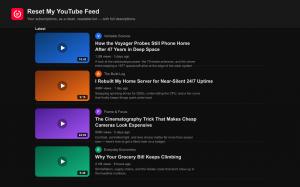
Sphnix, Inc. has released Reset My YouTube Feed, a no‑cost Chrome extension that transforms YouTube into a clean, single‑column list view and enables viewers to hide YouTube Shorts from their subscription feed with a single click. Designed for people who follow many channels, the extension provides a straightforward way to organize YouTube subscriptions — it swaps the usual grid of large thumbnails for readable rows that display each video’s complete title, channel name, upload date, and description inline.
Most existing YouTube tools fall into two camps: a collection of separate “hide Shorts” switches, or heavy‑handed “focus mode” blockers aimed at the homepage. Reset My YouTube Feed takes a different approach. It completely rebuilds the Subscriptions feed into a YouTube list view — a reading‑friendly layout for the channels you deliberately chose — and then gives you the controls to remove the clutter.
What it does (free, forever):
– YouTube list view for Subscriptions: a clean, single‑column reading layout with full video descriptions loaded inline.
– Hide YouTube Shorts, live streams, and premieres from the feed with a single switch.
– Keyword and channel blacklist: mute clickbait terms, spoilers, or entire channels without unsubscribing.
– Search, sort, and catch‑up tools to instantly filter your feed and mark everything as seen.
– Calm mode: grayscale thumbnails and tidy, de‑clickbaited titles for a distraction‑free feed.
– Duration overlays, scheduled focus hours, light and dark themes, and one‑click settings backup.
Optional Premium upgrade:
Power users can unlock a YouTube list view on channel pages (Videos and Live), smart filters by video length and upload date, filters and blacklists across all of YouTube, channel folders with per‑channel rules (mute, snooze, pin), saved custom layouts, 20+ accent themes, and turbo description loading.
“YouTube is great, but its feed is built to keep you scrolling, not to help you watch the channels you chose,” said Himanshu Batra, founder of Sphnix, Inc. “Reset My YouTube Feed turns your subscriptions into a quiet, readable list, hides Shorts, and lets you filter the noise. It is the YouTube feed I always wanted.”
Private by design: the free features run entirely in your browser, require no account, and include no ads, no tracking, and no third‑party analytics. Video descriptions are read directly from YouTube and cached locally on your device. Only if you buy Premium does the extension contact the company’s server to validate your license key, and payments are handled securely by Stripe.
Pricing and availability: Reset My YouTube Feed is available now, free, on the Chrome Web Store for Google Chrome and Chromium‑based browsers such as Microsoft Edge and Brave, with a Firefox version on the way. Premium is optional and starts at $0.99 per month, $9.99 per year, or $29.99 for lifetime access.
Download it free on the Chrome Web Store: https://chromewebstore.google.com/detail/majelkhcndicgpbeffeackldhdagfpmf . Learn more, see screenshots, and compare Free vs Premium at https://www.resetmyfeed.app .
About Sphnix, Inc.: Sphnix, Inc. builds calm, privacy‑respecting browser tools that give people back control of the software they use every day. Reset My YouTube Feed is its first product.
Reset My YouTube Feed is an independent product and is not affiliated with, endorsed by, or sponsored by YouTube or Google LLC. YouTube is a trademark of Google LLC.
Himanshu Batra
Sphnix, Inc
+1 571‑217‑0000
press@resetmyfeed.app